


Ultimate 8 Ball Pool
4.46.75K Reviews
App Specs
- Version
- 4.04.00
- Updated On
- License
- Free
- Downloads
- 1,000,000+
- Developer
- HypGames.
- Categories
- Sports
- Platform
- Android, iOS
Screenshots


 Analysis by AppCompare
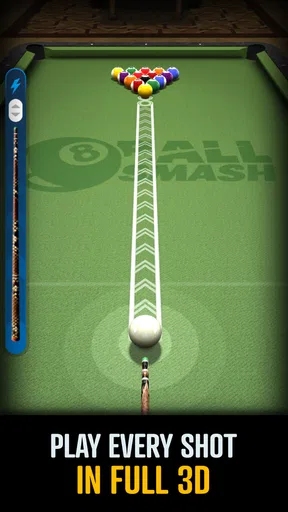
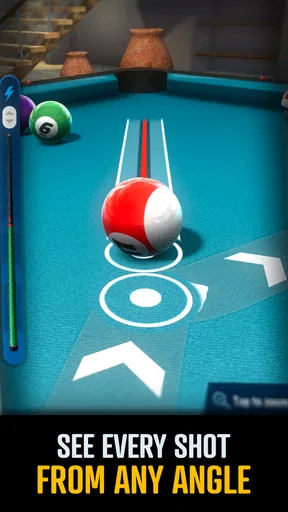
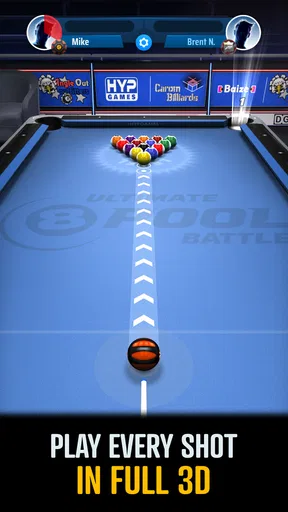
What makes a mobile pool game easy to return to is not just whether a shot goes in; it is whether the screen lets you understand what is happening and make the next decision without fuss. I find Ultimate 8 Ball Pool most appealing when I want a quick, familiar sports game with a real opponent on the other end. Its 3D presentation gives the table a sense of space, but the small-screen format also makes visibility, steady aiming, and the situation around you part of the experience.
Readability and finding your way around
Pool is a useful format for a phone because the basic objective is recognizable: line up a shot, judge the angle, and decide how much control to put into it. That familiarity helps newcomers spend less time learning a complicated ruleset and more time getting comfortable with the table. The 3D view also makes the game feel more like a tabletop activity than a flat puzzle, which is part of its appeal.
In my experience, the clearest way to approach a turn is to pause long enough to identify the target ball and the pocket before adjusting the aim. It sounds obvious, but on a small screen it is easy to focus on the cue and overlook where the cue ball may finish. Thinking through the whole sequence—contact, direction, and likely next position—makes practice more useful than simply taking the fastest shot.
The game is a sports title from HypGames, and its short description, Ultimate 8 Ball, captures the straightforward idea without explaining the feel of play. It is free to download, with optional in-app purchases ranging from $0.99 to $99.99 per item. That range is worth keeping in mind if you are deciding whether to let a child play or whether you prefer games with no optional spending. The age rating is Everyone, but I would still review purchase settings on a shared device before handing it over.
Motor and sensory considerations
Aiming in a pool game asks for controlled finger movement, and that can be a bigger factor than knowing the rules. If precise dragging is tiring or difficult, I would try a few low-pressure shots first and see whether the on-screen controls feel manageable on your device. A larger screen may make the table easier to inspect, while a phone is convenient but gives you less room for visual details and finger placement.
There is also a difference between understanding a shot and executing it comfortably. Players who need more time to make a movement may feel hurried in a live match, especially when they are still learning how the cue responds. I would practice when there is no social pressure, then move into online play once the controls feel predictable. If visual effects or a busy screen distract you, take a moment between turns to re-centre your attention rather than tapping through automatically.
When a quick match fits—and when it does not
The game’s online multiplayer focus makes it a natural choice when you want a little competition rather than a long single-player session. A match can give a spare break some structure: I can play a turn, consider the table, and enjoy the small tension of waiting to see whether a plan works. The store summary also highlights competing with friends, so it suits people who would rather share a familiar game than learn a new sport-themed format together.
Worth Reading Before You Choose

Flipboard Shows What News Apps Must Do Beyond the Feed

Switching to Android Auto Means Rethinking Your Driving Routine

Google Calendar Makes a Crowded Week Easier to Manage

Ludo King Makes the Most of the Minutes Between Plans

Baby Panda World Brings Quick Play to Modern Phones, but Its Game Library Feels Busy

ESPN’s Live Game View Makes Following Close Games Easier
That same live element is not ideal in every setting. If you are on a bumpy commute, trying to play while someone is talking to you, or dealing with an unreliable connection, careful aiming may be more frustrating than relaxing. It is also not the best fit if you want a purely offline pastime, a realistic substitute for practising on a physical table, or a game that never presents optional purchases. Compared with solo sports puzzles, this format puts more weight on another player and the pace of a match; compared with meeting friends around a real table, it is much easier to access but cannot reproduce the shared physical setting.
Getting Started with Ultimate 8 Ball Pool
First off, downloading this game is a breeze. It’s available on both Android and iOS, so no matter what device you’re rocking, you can get in on the action. Once installed, the app has a straightforward setup that gets you into the game quickly. No endless sign-up processes or complicated tutorials—just pure, unadulterated pool action.
Gameplay and Features
The gameplay in Ultimate 8 Ball Pool is smooth and quite intuitive. You start off with a simple tutorial that guides you through the basics like aiming, shooting, and applying spin. Don’t worry if you’re new to the game; the controls are pretty forgiving and easy to master.
For a more deliberate start, I recommend treating the tutorial as a chance to learn how your aim changes the cue ball’s path, not just as a checklist to finish. Try to notice whether you are lining up the object ball or planning where the cue ball will stop; those are related but different decisions. A simple habit that pays off is to set up each shot in two stages: pick the ball you want to hit, then check the cue ball’s likely position afterward. It helps turn luck into a repeatable plan without requiring advanced pool knowledge.
The graphics are crisp, and the animations are fluid, making each shot feel satisfying. I particularly appreciate the attention to detail in the ball physics. The developers have done a stellar job ensuring that the balls behave realistically, which is crucial for any billiards game worth its salt.
Still, a convincing-looking shot is not the same thing as a perfect practice tool. A phone screen cannot give you the stance, table feel, or physical cue feedback of playing billiards in person. I would use the game to enjoy quick matches and think about angles, not as a substitute for learning technique at a real table. That distinction matters most if your main goal is improving your offline game rather than having a portable digital version of pool.
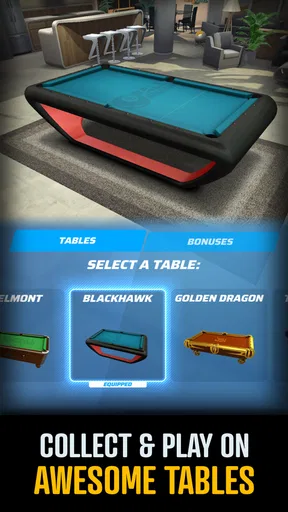
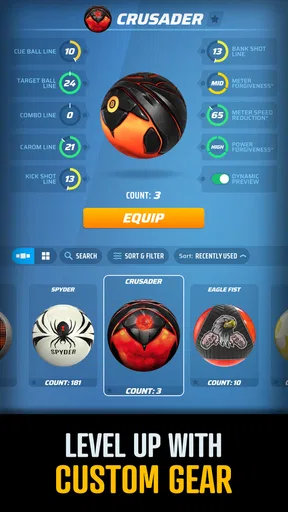
As you progress, you’ll unlock various cues and tables, each with unique designs and bonuses. The customization options are pretty extensive, allowing you to personalize your experience and show off your style. Plus, the in-game currency system for upgrades is fair, so you won’t be forced into spending real cash unless you really want to.
My practical advice is to separate cosmetic interest from competitive spending. If you enjoy changing the look of a cue or table, customization can make sessions feel more personal; if you are mainly here for the shots, there is no need to treat every upgrade as essential. Since paid items are available, I would avoid making purchases in the middle of a losing streak, when the temptation to buy an advantage or recover progress can feel stronger. The game is free to start, but that does not mean every optional item will suit every budget.
Multiplayer Mode
If you’re like me and enjoy some friendly competition, the multiplayer mode is where this app truly shines. You can challenge friends or match up against players worldwide. The matchmaking is quick, and I rarely experienced any lag during matches, which is a major plus.
For an everyday use case, I can see this fitting into a quiet break at home: I have enough time to focus, connect with a friend, and play without needing to arrange a physical table or carry equipment. That makes it especially convenient for people who already enjoy billiards but do not have regular access to a venue. On the other hand, I would not start a match when I have only a few seconds to spare or need to put my phone away at any moment. Even a casual online game asks for attention until the turn is settled.
Online play also changes the feel compared with a basic solo pool app. A solo alternative is usually better if you want to pause freely, repeat shots at your own pace, or play without relying on a connection. Here, the appeal is the human opponent: their choices make a familiar table less predictable. That is a worthwhile trade if competition is what keeps you interested, but a poor match if you want a quiet, interruption-proof game.
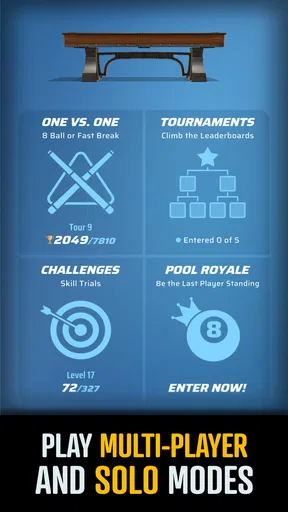
There’s also a tournament mode for those who crave a more competitive edge. Winning tournaments not only boosts your ranking but also earns you some sweet rewards. It really adds a layer of depth to the game, keeping you coming back for more.
I would approach tournaments as a step up from casual matches, rather than the best place to learn every control at once. First get comfortable judging shots in ordinary play; then the extra pressure can make competitive sessions more satisfying instead of stressful. If you prefer low stakes, there is no reason to chase a ranking simply because the option is there. The most enjoyable mode is the one that matches your mood and available attention.
Social and Community Features
What’s a game without a little social interaction? Ultimate 8 Ball Pool integrates seamlessly with social media, allowing you to connect with friends and share your achievements. The in-game chat feature is handy for a bit of banter during matches, although I’d advise keeping it friendly!
Social play can make a short match feel more personal, but it also means the experience depends partly on how comfortable you are interacting with other players. If you would rather concentrate on the table, you can keep your focus on the game itself and treat conversation as optional. I would also be thoughtful about what I share through any social features, particularly on a device used by several people or by a younger player.
There’s also an active community of players who share tips and tricks online. You can find forums and groups dedicated to strategies and help, which is perfect if you’re looking to improve your game.
For useful practice, look for advice that explains why a shot works rather than advice that promises a shortcut. A tip about controlling the cue ball’s final position, for example, is easier to apply across different tables than a one-off trick. I would test suggestions in a low-pressure match before relying on them in a tournament. That simple filter helps separate helpful technique from advice that may not fit your play style.
Version, suitability, and the trade-offs
The current version is 4.02.00, and the game supports Android 6.0 and later. It has a 4.5 average from around 31,000 ratings, with roughly 6,200 written reviews and over 1 million installs. Those figures suggest a well-established audience, though they cannot tell you whether the controls will suit your hands or whether online competition is the kind you enjoy. I would use them as context, then judge the game by a few practice shots and a match or two.
It is rated Everyone, which makes the theme broadly approachable, but that rating does not remove the need for a family decision about online interaction and optional spending. For a younger player, I would check the device’s purchase controls and agree on when multiplayer is appropriate. For an adult who wants a low-friction sports game, the bigger question is whether a live, touch-based pool match feels relaxing or demanding on their particular screen.
Players who benefit from larger text, high contrast, reduced motion, or alternative input methods should test the actual display and controls before settling in. I would not assume that a 3D table will be equally readable on every phone, or that dragging a cue will be comfortable for everyone. A tablet may offer more room to see the layout, while a physical table or a turn-based game may be a better choice for someone who needs more time or less precise finger control. The useful question is not whether the game is universally accessible, but whether its specific aiming and online rhythm work for you.
Wrapping It Up
Overall, my experience with Ultimate 8 Ball Pool has been overwhelmingly positive. It’s a well-rounded app that offers a fantastic blend of solo and multiplayer experiences, wrapped up in a visually appealing package. Whether you’re a casual player looking to kill some time or a competitive soul seeking a challenge, this game has something for everyone.
I would especially recommend it to someone who likes billiards, enjoys testing decisions against another person, and can give a match a little uninterrupted attention. I would steer away from it if you need a fully offline game, dislike touch aiming, or want a digital pool game with no optional purchases. Those are not small preferences: they determine whether the central appeal—making shots against real opponents—feels engaging or inconvenient.
The app is constantly updated with new features and improvements, which keeps the gameplay fresh and engaging. So, if you haven’t already, give it a shot. You might just find yourself hooked on this virtual pool table!
For me, the best way to decide is to begin with the free experience, learn the aiming at a comfortable pace, and keep purchases optional rather than part of the plan. If the table remains clear on your screen and the multiplayer pace fits your day, it is an easy game to revisit. If not, a slower solo pool game or an actual table with friends may be the more satisfying choice.
Pros
- Smooth gameplay with realistic physics.
- Wide variety of tables and cues.
- Engaging multiplayer mode.
- Regular tournaments with rewards.
- Customizable avatars and profiles.
Cons
- Occasional connectivity issues.
- Ads can be intrusive at times.
- In-app purchases can be pricey.
- Limited offline play options.
- Some cues require real money.
FAQs for Ultimate 8 Ball Pool
What are the main features of Ultimate 8 Ball Pool?
Ultimate 8 Ball Pool offers a realistic billiards experience with stunning graphics and smooth gameplay. It includes various game modes such as classic 8-ball, time-limited challenges, and multiplayer tournaments. The app also provides customizable cues and tables, allowing players to personalize their game environment for a unique experience.
Is Ultimate 8 Ball Pool free to play?
Yes, Ultimate 8 Ball Pool is free to download and play. However, it includes in-app purchases for additional features like premium cues, extra coins, and exclusive tables. These purchases can enhance gameplay but are not necessary to enjoy the full experience of the game.
Can I play Ultimate 8 Ball Pool offline?
Ultimate 8 Ball Pool offers both online and offline modes. While playing offline, users can enjoy single-player matches and practice sessions. For competitive multiplayer games and tournaments, an internet connection is required to connect with opponents worldwide.
How does multiplayer work in Ultimate 8 Ball Pool?
In multiplayer mode, players can compete against friends or other players globally. The game uses a matchmaking system to pair opponents of similar skill levels, ensuring fair and challenging matches. Players can also join tournaments to compete for rewards and leaderboard rankings.
What devices are compatible with Ultimate 8 Ball Pool?
Ultimate 8 Ball Pool is available for both Android and iOS devices. It requires Android 5.0 or later and iOS 10.0 or later. The game is optimized for both smartphones and tablets, providing a seamless experience across different screen sizes and resolutions.


